Cyber Security Course in Chennai

Learn Cyber Security in Chennai with Hands-On Labs, Cloud Security and Placement Support.

Learn to protect networks, applications and cloud infrastructure. Start with networking basics and Kali Linux, then move through threat modelling, network scanning and intrusion detection, application security testing with SAST and DAST tools, the OWASP Top 10, penetration testing with Metasploit and Burp Suite, Splunk SIEM log monitoring and AWS security services.

  • 500+ Hiring Partners
  • Lifetime Placement Support
  • Bilingual Training in Tamil & English
  • Global Certification Preparation
Cyber security concept with digital lock

Build Your Future in Cyber Security

Speak with our training team to explore the skills, certifications and support you need to get started.

  • Hands-On Security Labs & Real Tools
  • Dedicated Mock Interviews & Resume Building
₹70+ LPA
Highest Salary Potential
100%*
Placement Support
1,00,000+
Careers Launched
4
Flexible Training Modes

Why Choose Greens Technologies for Cyber Security Training in Chennai?

Greens Technologies provides IT training for students and working professionals seeking to develop practical, job-relevant technical skills.

Practical Learning

Industry-Relevant Curriculum

Experienced IT Trainers

Flexible Training Modes

Personalized Learning Support

Real-World Project Exposure

Placement Support

Flexible Batch Options

Meet Our Founder

A message from the leadership behind Greens Technologies.

Founder & Managing Director

Greens Technologies Leadership

Building Chennai's leading software training & placement institute

"Our mission is simple: make quality software education accessible, practical and 100% job-oriented."

What began as a single training center in Adyar has grown to 25 branches across Chennai, Trichy and Salem, offering training, consultancy and development services, with 1,00,000+ students placed through 500+ hiring partners.

15+ YearsIn IT Industry
1,00,000+Students Placed
25Branches

Meet Our Certified Senior Instructors

Learn under the direct mentorship of Greens Technologies leadership and industry practitioners, with 1-on-1 practical lab guidance.

Want to talk directly to our Trainer before enrolling?

Schedule a 15-minute 1-on-1 technical counselling session to discuss your background, syllabus questions, and custom career transition roadmap.

Placement Success Stories

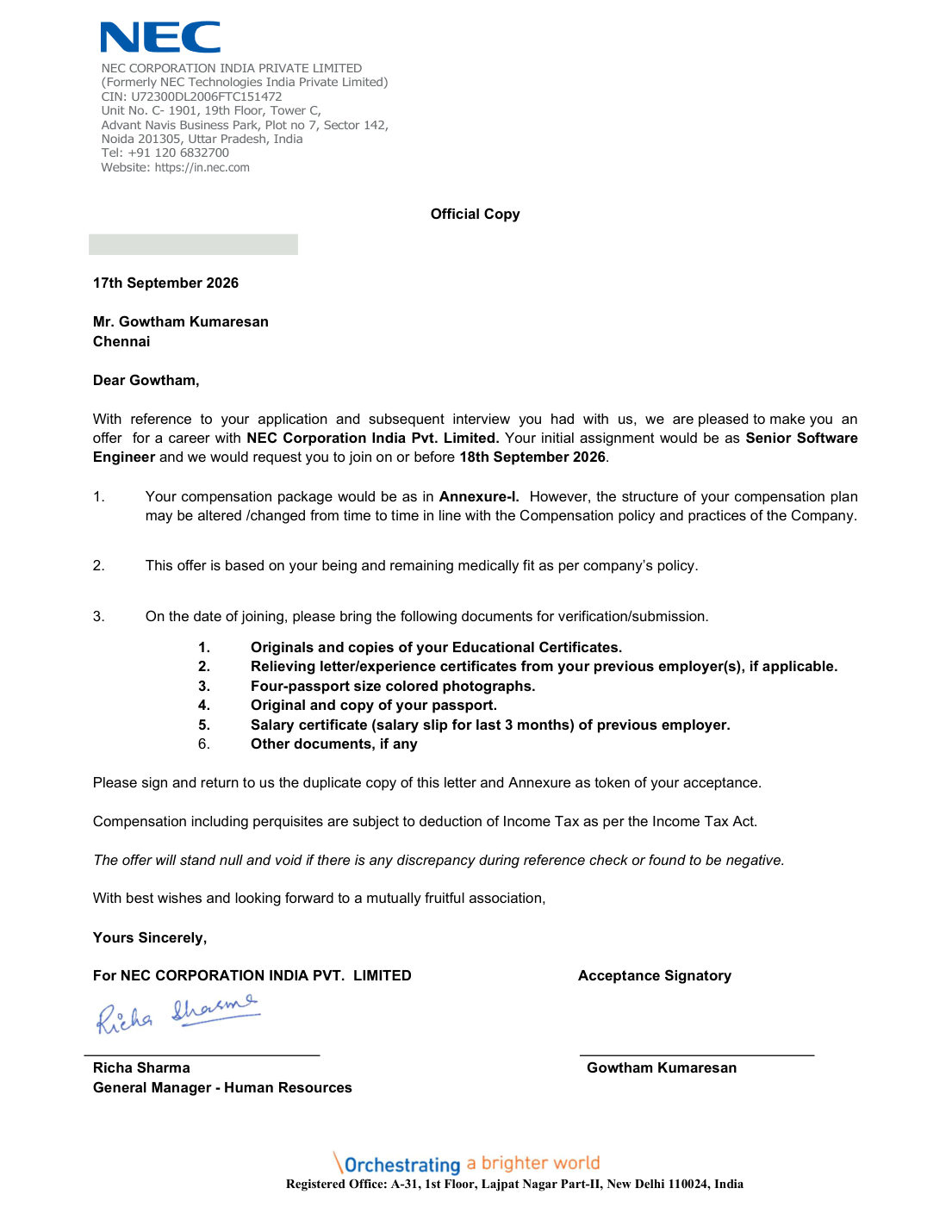
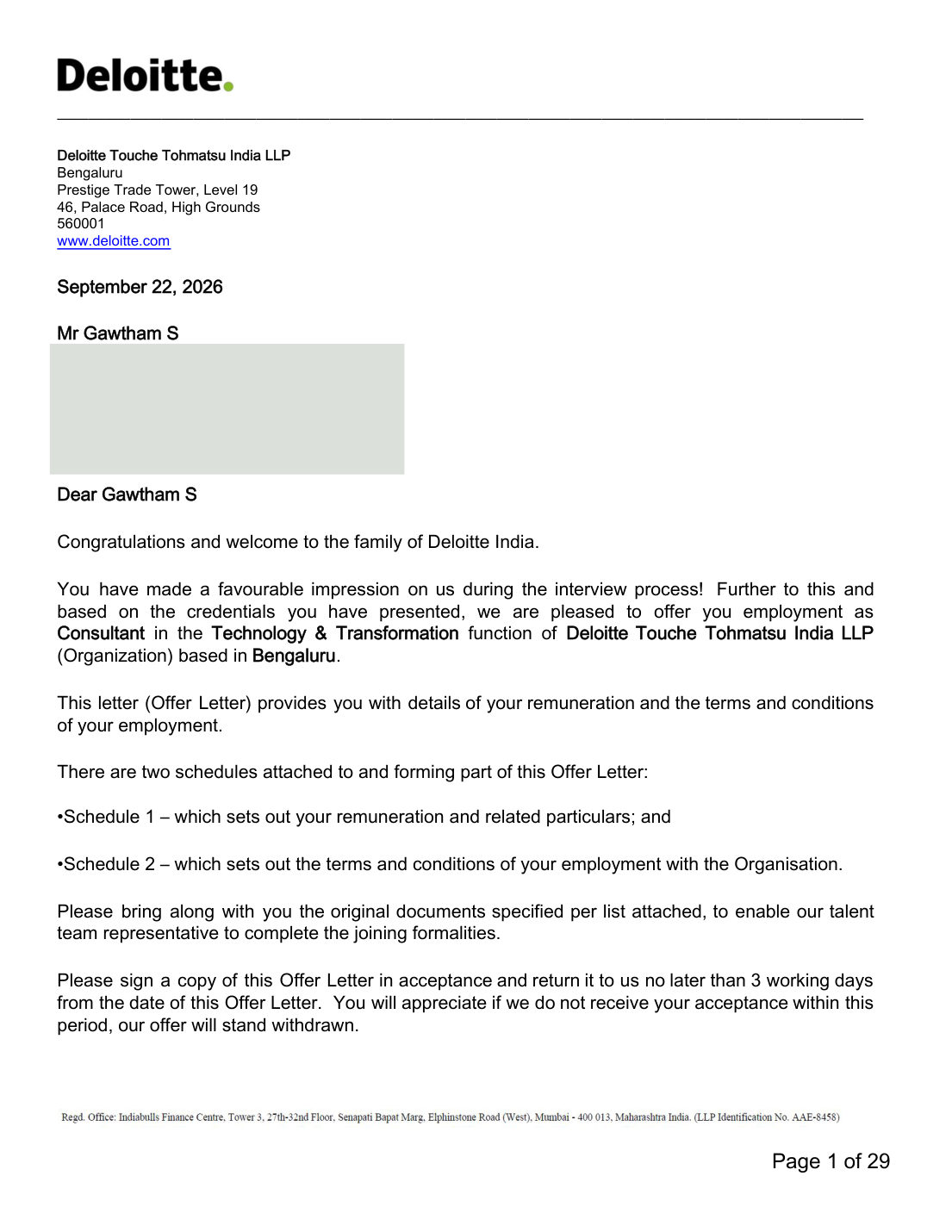
Verified offer letters from Greens Technologies Cyber Security students, showing the role and company each student moved into.

01 / 05
Select a Student Story

Get Industry Recognized Certification

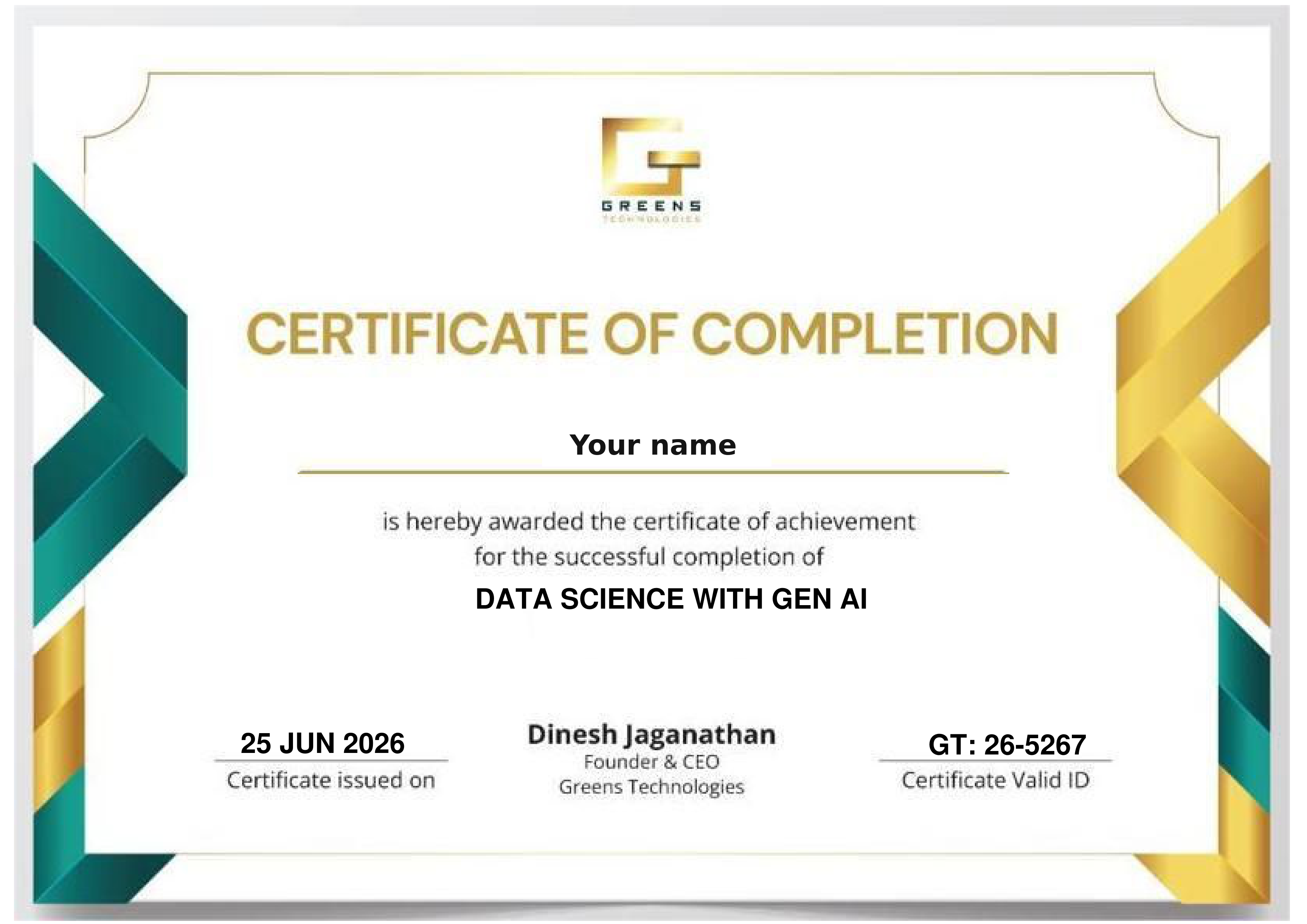
Talk to our counsellor about the course completion certificate available for the Cyber Security course, and how it can showcase your hands-on skills in network security, vulnerability assessment, penetration testing, application security tools and AWS security services.

Benefits of Cyber Security Certification

  • To demonstrate your hands-on skills with industry security tools like Nmap, Wireshark, Metasploit, Burp Suite and Splunk,
  • To add weightage to your professional resume & LinkedIn profile,
  • To prepare for recognised security certifications,
  • To stand out in interviews with practical lab experience.
Sample Greens Technologies certificate of completion

Optional Certification & Learning Pathways

Optional external learning and exam options students can pursue alongside the course. External providers set their own requirements and fees.

Ask our counsellor about the course completion certificate available for this course, covering network security, application security testing, penetration testing and AWS security.

A widely recognised entry-level security certification covering threats, vulnerabilities, network security and incident response - an optional external exam.

An optional external credential in ethical hacking and penetration testing, building on the Nmap, Metasploit and Burp Suite modules.

An optional advanced AWS exam on cloud security, building on the IAM, KMS, GuardDuty, Inspector, Macie and Secrets Manager modules.

Course Curriculum 2026 - One Course. A Clear Sequence.

From networking basics to cloud security: every topic below comes from the official Greens Technologies Cyber Security syllabus, organised into 5 phases.

Why security matters, networking fundamentals and Kali Linux.

  • Importance of Security – Application Stack
  • Okta data breach, Sony Pictures (case studies)
  • What is Cybersecurity
  • Scopes in Cybersecurity
  • Openings for Cybersecurity
  • Pre-requisites for cybersecurity
  • Future opportunities and salary package
  • Our course content discussion
  • Difference between Information Security and Cyber Security
  • Difference between Cybersecurity and Ethical Hacking
  • Types of Hackers
  • The Hacking Methodology
  • Cyber Security Policies
  • Basic terminologies of computer networks
  • Types of enterprise computer networks
  • Types of computer network architecture
  • Network devices
  • OSI Model
  • Network protocols
  • Network topology
  • Kali Linux setup and tools
  • Kali Linux features and usage
  • Kali Linux commands

Threat modelling, network scanning, intrusion detection and traffic analysis.

  • What is Threat Modelling and why we need it
  • Bugs and their role in Threat Modelling
  • Understanding vulnerabilities
  • Prioritization and risk minimization: how to prioritize bugs and minimize risks
  • Which projects benefit from Threat Modelling, and when to start
  • Teams involved in Threat Modelling
  • 6 steps in Threat Modelling
  • STRIDE & DREAD frameworks
  • Overview of Threat Modelling tools and techniques
  • Introduction to Nmap
  • Host discovery and ping scanning
  • Three-way handshake
  • Nmap scan techniques and port specification
  • Port states in Nmap
  • Service, OS and version detection
  • Firewall, IPS and IDS spoofing
  • Nmap Script Engine - advanced scanning
  • ZenMap
  • Introduction to Intrusion Detection Systems (IDS)
  • Intrusion detection methodology
  • Types of intrusion detection and prevention systems
  • Snort installation scenarios
  • Snort fundamentals and configuration
  • Snort rule syntax
  • Crafting basic Snort rules
  • Detecting known vulnerabilities with Snort rules
  • Detecting novel vulnerabilities with Snort rules
  • Suricata introduction and installation
  • Suricata configuration and rules
  • Wireshark introduction
  • Wireshark installation and network activity tracking

Code review, SAST/DAST/IAST, security scanning tools in CI/CD and SIEM monitoring.

  • Importance of code review
  • What is SAST, DAST and IAST
  • Integrating GitLab with SAST & DAST tools
  • How to use GitLab as a pipeline tool
  • Benefits of using SonarCloud
  • SonarCloud (cloud-based) vs SonarQube
  • Code quality improvement and early bug detection
  • Security vulnerability and code duplication detection
  • Comprehensive code review
  • Integration with CI/CD pipelines
  • Support for multiple languages
  • Customizable quality gates
  • Benefits of OWASP ZAP and open-source flexibility
  • Integrating OWASP ZAP with GitLab
  • Detecting vulnerabilities using OWASP ZAP
  • Benefits of Snyk: continuous monitoring and compliance
  • Dependency monitoring and early detection of vulnerabilities
  • Integrating Snyk into the development workflow
  • Introduction to Trivy and installation
  • OS packages and software dependencies scanning
  • Docker image and Git repository scanning
  • Infrastructure as Code (IaC) issues and misconfigurations scanning
  • Introduction to Nessus and installation
  • Host discovery, penetration testing and vulnerability assessments with Nessus
  • Introduction to Checkmarx and installation
  • Features, advantages and uses of Checkmarx
  • Static Application Security Testing (SAST)
  • What Acunetix is and what it can scan
  • Setting up Acunetix and scanning techniques
  • Integration with DevOps
  • Common vulnerabilities detected by Acunetix
  • Best practices for secure development
  • Splunk tool setup
  • Log monitoring
  • Splunk features and usage

Google Dorking, the OWASP Top 10, common attacks, Metasploit, Burp Suite and password security.

  • Definition, purpose and applications of Google Dorking
  • Anatomy of URLs relevant to Google Dorking
  • Examples and breakdown of Google Dorking syntax
  • Key principles and ethical considerations
  • Google Dorking operators and modifiers: basic & advanced
  • Practical aspects of Google Dorking
  • Identifying directory listing vulnerabilities
  • Techniques to find SQL injection vulnerabilities
  • Dorking for web server versions
  • Broken Access Control
  • Cryptographic Failures
  • Injections
  • Insecure Design
  • Security Misconfiguration
  • Vulnerable and Outdated Components
  • Identification and Authentication Failures
  • Software and Data Integrity Failures
  • Security Logging and Monitoring Failures
  • Server-Side Request Forgery (SSRF)
  • Common attacks: SQL injection, DoS & DDoS, Man-in-the-Middle, DNS spoofing, password attacks, brute force, phishing, malware, password spraying and XSS
  • Cybersecurity defences
  • Definition and understanding of penetration testing
  • Risk mitigation, vulnerability discovery and remediation
  • Continuous improvement of security posture
  • Importance and challenges of penetration testing
  • Types: network, white box, black box, grey box, wireless and physical penetration testing
  • The penetration testing process: planning, scanning, gaining access, maintaining access, analysis & reporting
  • Famous tools: Metasploit, Nmap, Wireshark and Burp Suite
  • Metasploit introduction, definition and history
  • Metasploit modules: payload, exploitation, NOPs, auxiliary, evasion, post-exploitation and encoders
  • Benefits and architecture of Metasploit
  • Basics and components of the Metasploit Framework
  • msfconsole and Metasploit location directories
  • Basic commands: show, search, use, info, options and set
  • Choosing the payload and checking if the exploit will work
  • A penetration test walkthrough: target identification, host discovery, port scanning, service detection and vulnerability analysis
  • Exploiting vulnerabilities: VSFTPD, Samba SMB and VNC; keeping sessions in the background
  • Burp Suite introduction, workflow and working process
  • Community vs Professional vs Enterprise editions
  • Burp Suite pen testing process and features
  • Getting started: system requirements, download and install
  • Configure network and CA certificate on browser
  • Intercepting HTTP traffic and modifying requests
  • Setting the target scope and reissuing requests
  • Running your first scan and generating a report (Pro only)
  • Testing workflow: Intruder, Decoder, Repeater and Comparer
  • Target scope and site map; Proxy and HTTP history
  • Extensions using BApp and API process flow
  • Intercept hands-on
  • What is a password manager and why use one
  • Password manager multi-cloud usage
  • Hands-on with password managers: LastPass and 1Password
  • Understanding brute force attacks and strategies
  • Best practices and case studies
  • Continuous improvement and future trends
  • Prevention steps for brute force attacks

Core AWS services, then the AWS security services used to protect them.

  • Introduction to cloud and AWS services; AWS history
  • Private vs public cloud; IaaS vs SaaS vs PaaS
  • Scope and features of AWS
  • Launching EC2 servers and hosting a web application
  • Elastic Block Store (EBS) use cases and Elastic IP creation
  • Amazon Machine Image (AMI) and snapshots from volumes
  • S3: creating and deleting buckets; adding, getting and deleting objects
  • Static website hosting with S3, S3 permissions and lifecycles
  • Creating user accounts in AWS
  • Setting up multi-factor authentication (MFA)
  • Roles and groups in IAM
  • Delegating permissions and creating custom policies
  • Account settings
  • What is Elastic Load Balancer
  • Setting up ELB & Auto Scaling hands-on
  • Benefits of ELB & ASG with WAF
  • Types of networks in AWS; public vs private
  • Creating a VPC, routing tables and security groups
  • Internet Gateway and NAT Gateway
  • KMS: importance of encryption; symmetric and asymmetric keys hands-on
  • RDS: selecting and configuring the engine, creating the database, automatic backups and DB security groups
  • Route 53: hosted zones, custom domain hosting and routing policies
  • AWS Inspector: purpose, key concepts, setup and assessment targets
  • Rules packages, agents and running scheduled assessments
  • Interpreting and fine-tuning assessment results
  • Amazon Macie: sensitive data identification, configuration and dashboard
  • Macie reports, CloudWatch and S3 integration, data privacy best practices
  • Trusted Advisor: check categories, cost optimization and resource usage
  • Security, performance, reliability, high availability and fault tolerance checks
  • GuardDuty: threat detection, monitoring and key features
  • Enabling GuardDuty, managing detectors and tuning detection settings
  • Interpreting findings, investigating and responding to alerts
  • Secrets Manager: use cases and managing sensitive information
  • Storing database credentials, API keys and access tokens
  • Rotating and automating secret rotation
  • Access control, permissions and monitoring secret usage

Build Practical Cyber Security Skills

Hands-on labs taken from the course syllabus, using the same tools security teams use every day. The lab mix can vary by batch.

Lab 01

Network Reconnaissance with Nmap

Platform: Kali Linux & Nmap

Discover hosts, scan ports, detect services and operating systems, and run Nmap Script Engine scans against a lab network.

Kali Linux Nmap ZenMap
Lab 02

Intrusion Detection with Snort & Suricata

Platform: Snort, Suricata & Wireshark

Install and configure an IDS, write rules that detect known and novel attacks, and track network activity in Wireshark.

Snort Suricata Wireshark
Lab 03

DevSecOps Pipeline in GitLab

Platform: GitLab, SonarCloud, OWASP ZAP, Snyk & Trivy

Add SAST, DAST, dependency and container scanning to a GitLab pipeline, then review and fix the vulnerabilities it reports.

SAST DAST GitLab Trivy
Lab 04

Penetration Test Walkthrough with Metasploit

Platform: Metasploit Framework

Follow a full pen test: target identification, port scanning, vulnerability analysis and exploiting VSFTPD, Samba SMB and VNC in a lab environment.

Metasploit msfconsole Exploitation
Lab 05

Web Application Testing with Burp Suite

Platform: Burp Suite

Intercept and modify HTTP traffic, set the target scope and use Intruder, Repeater, Decoder and Comparer to test a lab web application.

Burp Suite OWASP Top 10
Lab 06

Securing an AWS Environment

Platform: AWS IAM, KMS, GuardDuty, Inspector & Macie

Set up IAM with MFA, encrypt data with KMS, and enable GuardDuty, Inspector and Macie to detect threats and sensitive data.

AWS IAM GuardDuty

Your portfolio tells the story: In interviews, walk through the scans you ran, the vulnerabilities you found, how you reported them and how they were fixed. Practical lab evidence sets you apart from candidates who only know the theory.

READY TO START? ENROLL TODAY

Reserve your seat in our classroom batches in Chennai, Bengaluru, Coimbatore, Trichy and Salem, or join a live online batch.

Flexible 1-on-1 batches, a portfolio project at the end of the course, and the chance to talk directly to our trainer.

Call +91 8939915577 Call +91 8939915572

Upcoming Cyber Security Training Batches

New batch every Monday & Friday Classroom & Online Live Tamil & English Instruction
Early Morning Slot
6:00 AM - 7:30 AM
Classroom & Online Live
Morning Slot
8:00 AM - 9:30 AM
Classroom & Online Live
Late Morning Slot
11:00 AM - 12:30 PM
Classroom & Online Live
Afternoon Slot
2:00 PM – 3:30 PM
Classroom & Online Live
Evening Slot (Popular for Working Pros)
7:00 PM - 8:30 PM
Classroom & Online Live

4 Distinct Training Delivery Modes

Choose the learning structure that matches your current schedule, location, and career goals.

Online Live Training

Live instructor-led, India & abroad

Classroom Training

Hands-on labs at 25 branches

1-on-1 Fast Track

Custom pace & scope

Corporate Training

Custom enterprise batches

Who Should Take This Cyber Security Course?

Designed for freshers and IT professionals who want a hands-on route into security roles.

Course Prerequisites

Basic computer knowledge is enough to start. The course begins with networking basics and Kali Linux before moving into security tools, application security and cloud security.

Networking from the Basics Hands-On Labs Live Mentor Guidance

Freshers & College Students

Network & System Administrators

Software Developers

Manual & Automation Testers

DevOps & Cloud Engineers

IT Support Professionals

Career Switchers into Security

Professionals Upskilling to DevSecOps

Placement Support - Learn. Prepare. Get Placed.

Practical training, project preparation and career services in one course. Our dedicated placement cell bridges the gap between your training and your first Cyber Security role.

Placements Guaranteed Build your skills and prepare for the next step with Greens Technologies

Resume Preparation

Mock Interviews

Job-Ready Profiles

Interview Coordination

Our Students Work at Global Tech Leaders

Greens Technologies graduates are hired across top product companies and multinational IT consultancies.

Zoho
Freshworks
Amazon
Microsoft
Google
Swiggy
Flipkart
Paytm
TCS
Infosys
Wipro
Cognizant
HCLTech
Accenture
Capgemini
LTIMindtree
500+ Active Hiring Partners
100% Placement Support
₹10 - ₹70+ LPA Salary Packages
1,00,000+ Careers Launched

Cyber Security Top Interview Questions & Answers

Practise the interview questions security roles ask on networking, threat modelling, the OWASP Top 10, penetration testing, security tools and AWS security, so you can walk into technical rounds with confidence.

Where Cyber Security Creates Business Value

Every organisation that runs software needs to protect it. Our training focuses on the security work Chennai and pan-India employers hire for:

Vulnerability Assessment & Penetration Testing

Find and report weaknesses in networks and web applications before attackers do.

Secure Software Delivery (DevSecOps)

Build SAST, DAST and dependency scanning into CI/CD pipelines so issues are caught early.

Network Monitoring & Intrusion Detection

Detect suspicious traffic and attacks with Snort, Suricata and Wireshark.

Security Operations & SIEM

Monitor logs and respond to alerts with Splunk.

Cloud Security on AWS

Protect AWS workloads with IAM, KMS, GuardDuty, Inspector, Macie and Secrets Manager.

Course FAQs

Everything you need to know about the Cyber Security programme, certification, placements and how we handle your data.

Every organisation that runs software, networks or cloud systems needs people who can protect them. This course prepares you for security analyst, vulnerability assessment, penetration testing, DevSecOps and cloud security roles with hands-on practice on industry tools.

Cyber security is the overall practice of protecting systems, networks and data. Ethical hacking is one part of it: authorised testing that finds weaknesses before attackers do. The course covers both, and explains the difference in the first module.

Networking basics, Kali Linux, threat modelling (STRIDE & DREAD), Nmap, Snort, Suricata, Wireshark, application code review with SAST/DAST/IAST, SonarCloud, OWASP ZAP, Snyk, Trivy, Nessus, Checkmarx, Acunetix, Splunk SIEM, Google Dorking, the OWASP Top 10, penetration testing with Metasploit and Burp Suite, and AWS security services including IAM, KMS, GuardDuty, Inspector, Macie and Secrets Manager.

Talk to our counsellor about the course completion certificate available for this course. Students can also pursue optional external certifications such as CompTIA Security+, Certified Ethical Hacker (CEH) and AWS Certified Security – Specialty. External providers set their own requirements and fees.

No. The course starts with networking basics and Kali Linux. Basic computer knowledge is enough to begin, and the trainer can advise you on preparation based on your background.

Yes. All attacks and exploits are practised only in lab environments set up for training, and the course covers the ethical and legal principles of authorised security testing.

Greens Technologies provides placement support connecting your training to opportunities across its 500+ hiring partner network, including resume guidance, mock interviews and technical interview preparation.

Yes. Book a free demo class or a 15-minute 1-on-1 counselling session with our trainer to discuss your background, the syllabus and your career roadmap before you enrol.

25 Greens Technologies Branches in Chennai, Bengaluru, Coimbatore, Salem and Trichy

Visit your nearest branch for walk-in counseling, lab tours, and live classroom batches. Also present in Salem, Trichy, Bengaluru and Coimbatore. Online live batches serve learners across all of India.

11 First Street, Padmanabha Nagar
Adyar, Chennai - 600020
19, Balamurugan Garden, Rajiv Gandhi Salai
Thoraipakkam, Chennai - 600097

Landmark: Opp. to Geetham Restaurant

No. 1, Appa Rao Colony
Tambaram Sanatorium, Chennai - 600047

Landmark: Opp. Sri Rama Anjaneyar Temple, near HP Petrol Bunk

No. 12, Rajiv Gandhi Salai (OMR), Egattur Village
Navalur (just before Navalur Tollgate), Chennai - 600035
149, 1C/1D, 1st Floor, Opp. to DLF IT Park
Ramapuram, Chennai - 600089
1st Floor, Plot No. 19 & 20, American Advent Christian Layout
Sholinganallur to Medavakkam Main Road, Perumbakkam, Chennai - 600100

Landmark: Next to OMR Food Street

Ground Floor, New No. W125, Old No. W42, 3rd Avenue, W Block
Anna Nagar, Chennai - 600040

Landmark: Near Parambriym Hotel, opp. HP Petrol Bunk

No. 05, Bakthavachalam Street
West Tambaram, Chennai - 600045
51-A, 2nd Floor, Velachery Road, Dhadeswaram Nagar
Velachery, Chennai - 600042
79, 100 Feet Road, Thiru Nagar Colony, NGO Colony
Vadapalani, Chennai - 600026
New No. 398, Old No. 577, CTH Road, Avadi Checkpost
Avadi, Chennai - 600054
No. 01, Adithi Colony, Mugalivakkam Main Road
Mugalivakkam, Porur, Chennai - 600116
162, Second Floor, Anna Salai, Express Estate
Triplicane, Chennai - 600002
No. 7, 2nd Floor, Perambur Paper Mills Road
Kolathur, Chennai - 600099

Landmark: Near Everwin Vidhyasram School, above Axis Bank

160, North Usman Road
T. Nagar, Chennai - 600017
3rd Floor, No. 27/A, North Park Street, Secretariat Colony, Venkatapuram
Ambattur, Chennai - 600053
162, Grand Southern Trunk Road, near Guduvancheri Railway Station
Nandivaram, Guduvancheri - 603202
75/E-3, Sri Krishna Enclave, 2nd Floor, Salai Road
Thillai Nagar, Tiruchirappalli - 620018
2nd Floor, Sri Sai Kamatchi Complex, Vincent
Salem - 636007

Landmark: Opp. to Government Arts College

No. 280 K, Saranya Complex, Velachery Road, Shanthi Nagar
New Kunagkurichi, Gowriwakkam, Sembakkam, Chennai - 600073
No. 1050, 2nd Floor, Tiruvottiyur High Road, Thangal
Near Kaladipet, Rajakadai Metro, Chennai - 600019

Landmark: Above KFC

Om Sakthi Plaza, First Floor, Old No. 1, New No. 126, Avadi Road
Karayanchavadi, Poonamallee, Chennai - 600056

Your Dream Job in Cyber Security Starts with the Right Training.

Get the skills, practical experience and interview preparation you need to pursue better job opportunities. Start your training with Greens Technologies and benefit from dedicated placement assistance along the way.

Call Advisor
Thank you! Our career counsellor will contact you shortly.